Styling tables using CSS
Created: 2022-10-10
table {
table-layout: fixed;
width: 100%;
border-collapse: collapse;
border: 3px solid purple;
}
A table-layout value of fixed is generally a good idea to set on your table,
Normally, table columns tend to be sized according to how much content they contain,
which produces some strange results.
With table-layout: fixed,
you can size your columns according to the width of their headings,
A border-collapse value of collapse is standard best practice for any table styling effort.
By default, when you set borders on table elements, they will all have spacing between them:
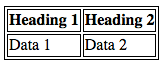 .
.
With border-collapse: collapse; set,
the borders collapse down into one:
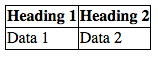 .
.
:nth-child() selector
Table Stylings Quick Tips
- Make your table markup as simple as possible, and keep things flexible, e.g. by using percentages, so the design is more responsive.
- Use
table-layout: fixedto create a more predictable table layout that allows you to easily set column widths by settingwidthon their headings (<th>). - Use
border-collapse: collapseto make table elements borders collapse into each other, producing a neater and easier to control look. - Use
<thead>,<tbody>, and<tfoot>to break up your table into logical chunks and provide extra places to apply CSS to, so it is easier to layer styles on top of one another if required. - Use zebra striping to make alternative rows easier to read.
- Use
text-alignto line up your<th>and<td>text, to make things neater and easier to follow.
Interactive Graph
Table Of Contents